
Fair Housing and Fee Compliance Software for Property Managers: Compliance360 and Point Tools Compared for Multifamily
For marketing, compliance and operations leads at multifamily operators shortlisting renter-facing compliance software.
Property managers can buy one compliance suite or stitch together point tools. Compliance360 checks fees, fair housing language, listing consistency, accessibility and property images per property and archives what renters saw on one audit trail. Point tools are strong in single areas, but most fee and fair housing products display or route content rather than audit it.
- Sort every vendor into display, audit or evidence before comparing features; most fee tools only display what the PMS sends.
- A fair housing tool that does not know which protected classes apply at each address cannot check source of income language.
- Archiving vendors such as Pagefreezer and MirrorWeb are built for financial services and legal teams, not rental pricing pages.
- Buy a point tool for one surface at a few properties; buy a suite when properties span jurisdictions, channels multiply and one team answers the demand letter.
This guide is general information, not legal advice. Laws and regulator guidance change; check the current rules for your properties with your counsel before acting.
Display, audit or evidence: sort vendors before you compare them
Shortlists fail when they compare tools that do different jobs. Sort vendors first.
| Type | What it does | Examples checked for this guide |
|---|---|---|
| Display | Publishes the data you configure: fees, total price, copy | Entrata fee configuration and API, Engrain SightMap all-in pricing |
| Workflow | Routes reviews, approvals and sign-offs | Process Street |
| Audit | Reads what is actually published and tests it against a rule | EstatePass checker (one text at a time), Deque axe Monitor, Siteimprove, Pope Tech, Compliance360 |
| Evidence | Captures and preserves what a page showed | Pagefreezer, MirrorWeb, Page Vault, SiteArchiver |
A display tool cannot tell you it failed. If the PMS fee schedule is wrong, or an ILS maps a fee to the wrong field, it publishes the error faithfully.
Compliance360: one rulebook, one trail across six services
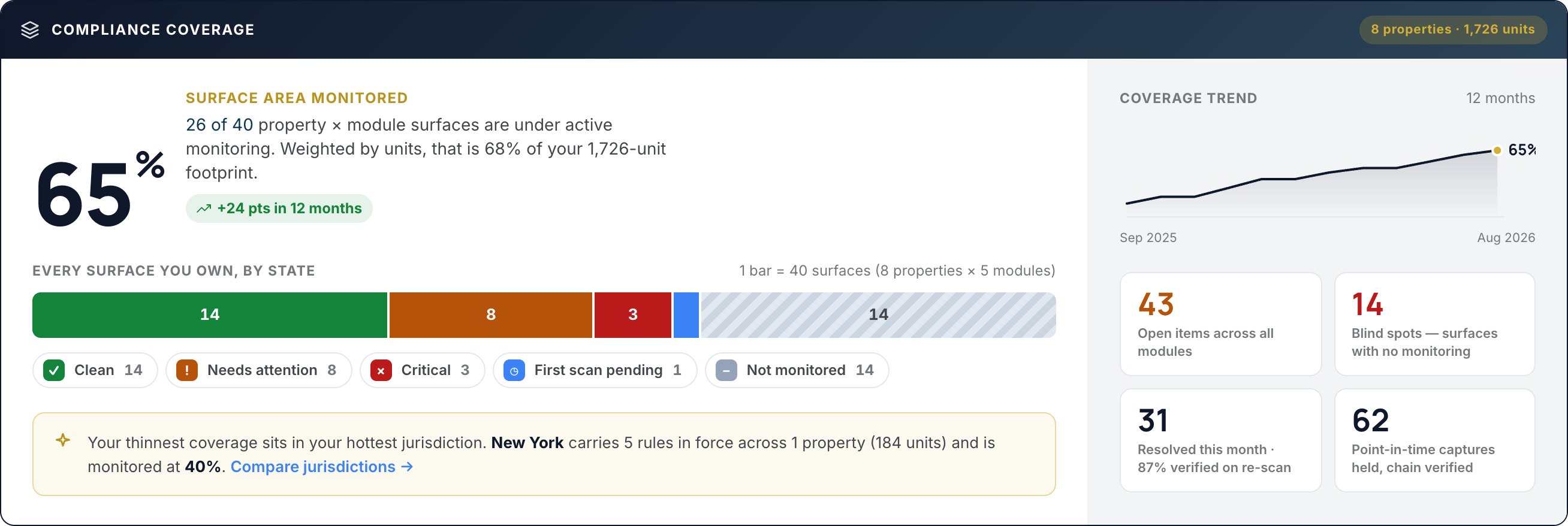
Compliance360 has six services, all sold today: Fair Housing, Fee Transparency, Listing Consistency, Web Accessibility, FrameCheck and SiteArchiver. The case for a suite is that jurisdictions are resolved once per property and every finding lands on one record.
Fee Transparency checks pricing, floor plans, unit listings and the application flow nightly; Listing Consistency compares five listing sources with your PMS feed; SiteArchiver keeps hash-chained captures that each finding can point to. That link is what a stitched stack loses.
A renter's attorney cites a $250 admin fee shown on an ILS listing in March. In the suite, the Listing Consistency finding for that listing, the SiteArchiver capture of the property website from the same night and the Resolution Center record of the fix sit on one property record. In a stitched stack, each lives in a different tool.
Fee transparency software: display tools vs fee auditing
The rule your fee display has to meet is concrete. In the stipulated order in FTC and Colorado v. Greystar, the Total Monthly Leasing Price "means the entire monthly amount a tenant must pay to lease a Property, including all mandatory monthly costs or fees associated with the Property, and excluding variable utility costs and optional fees." Any representation of what a consumer must pay has to display it "more prominently than any other representation regarding Pricing Information" (order, Definition K and Section II.A). Its terms are written for Greystar, but it is the clearest public spec for an all-in price, and it is the test a fee audit tool should be able to run. State rules are mapped in rental junk fee laws by state.
| Tool | What it does | What it cannot see |
|---|---|---|
| Entrata fee transparency | Fee configuration in the PMS; shares "all mandatory and optional fees" with ILS partners through its getUnitRentMatrixData API | How each ILS then renders those fees |
| Engrain SightMap all-in pricing | Shows base rent plus all mandatory monthly fees "that have a numerical value" on the map | Text-only fees such as usage-based charges, which it cannot sum; other surfaces |
| ILS total-price fields | Display the fees your feed or listing manager supplies | Whether the feed was right, and every other site |
| Compliance360 Fee Transparency | Reads your website, map, fee guide and application flow nightly and tests them per property | Nothing it is not pointed at: coverage gaps show as unmonitored |
Brynson works with Engrain as a partner (announcement). Brynson also works with the major ILSs as partners. Display tools are the pipe, not the inspection. In Brynson's analysis of 6,000 properties and 1.6M units, although 97% of listings had been updated within the previous 90 days, conflicting mandatory fees, missing amenities and contradictory terms persisted.
Fair housing ad copy: checkers, workflow tools and jurisdiction
Federal law makes it unlawful to publish any rental advertisement "that indicates any preference, limitation, or discrimination based on race, color, religion, sex, handicap, familial status, or national origin" (42 U.S.C. 3604(c)). Source of income is not on that list. Some states and cities add it: Washington bars any rental advertisement "that indicates a preference, limitation, or requirement based on any source of income" (RCW 59.18.255). That is why the same "no vouchers" line can be lawful at one property and unlawful at the next. See source of income laws by state.
| Tool | How it handles the phrase |
|---|---|
| EstatePass checker (free) | Paste one document and optionally pick a state. Its page cites "perfect for young professionals" as the kind of phrase that can violate fair housing law. It says documents are analysed and not stored, so there is no portfolio view or record of review. |
| Process Street | Turns advertising and other fair housing tasks into assigned workflows "with audit history". It does not describe reading the copy itself, so a reviewer has to spot the phrase. |
| Compliance360 Fair Housing | Reads copy span by span across ILS, website, Google, Meta and social; resolves classes protected at each address; gives the rule basis, a rewrite and every property running the phrase. |
Free checkers are useful for a single listing before it goes out. They do not follow one template across five ILSs and two ad platforms. Words to watch are in fair housing words to avoid.
Web archiving and evidence: built for finance and law, not rent pages
| Vendor | Built for | Gap for a rental operator |
|---|---|---|
| Pagefreezer | Website, social and chat archiving for financial services, government, education, public safety and insurance; cites FINRA, SEC and FOIA recordkeeping | No fee or fair housing findings to attach captures to |
| MirrorWeb | Automatic, replayable website archiving aimed at regulated financial firms (it cites FINRA Rule 2210 and SEC Rule 17a-4) | Evidence without the audit that says which capture matters |
| Page Vault | Browser-based capture software and done-for-you capture services for legal teams, including law firms and state attorneys general | Its site describes captures a person decides to make, not scheduled monitoring, so last March is only on file if someone captured it |
| SiteArchiver | Property pricing, fee, floor plan and application pages, daily and on change, in six visitor personas | Covers the property websites it is set up on |
A demand letter asks what this page showed on this date. That needs the capture and the finding together. Retention and chain-of-custody detail is in compliance evidence retention.
Accessibility scanners and photo tools: the short version
Accessibility. Site-wide scanners such as Deque axe Monitor, Siteimprove and Pope Tech (built on the WebAIM WAVE engine) are mature. Overlays are a different product. On April 22, 2025 the FTC finalised a $1 million order barring accessiBe from claiming its automated products can make any website WCAG-compliant unless it has evidence to support the claim (FTC). What that means for overlays is covered in accessibility overlays on apartment websites. The full comparison is in website accessibility tools for property management.
Photos. Truepic verifies images at the moment of capture; Hive returns confidence scores for whether media is AI-generated. Neither compares a listing photo with your own original, which is what FrameCheck does before a person decides. Details are in AI listing photo verification tools.
Listing consistency: the category point tools skip
In researching this guide we did not find a standalone tool that pulls a property's listings from several ILSs and compares each field with the PMS. Most teams do it in browser tabs. Compliance360 Listing Consistency pulls five sources nightly (Apartments.com, Apartment List, Zillow, Zumper and HelloData) and compares rent, fees, units, pet policy, amenities, floor plans and photos with the PMS feed. Brynson's analysis of 6,000 properties and 1.6M units found about 89% of communities described themselves differently across listing sites, so a manual sample of a few listings rarely finds the drift. Brynson powers 1 in 20 U.S. apartment communities, which is where that dataset comes from. The method is in the apartment listing accuracy report and the checks in the ILS listing audit.
Point tool or suite: the decision table and the cost of a stitched stack
| Factor | Point tool fits | Suite fits |
|---|---|---|
| Properties | A handful, in one market | Dozens or more |
| Jurisdictions | One state, no city overlays | Several states or cities with their own fee or protected-class rules |
| Channels | Website only | Website plus several ILSs, Google and Meta |
| Who answers the demand letter | Outside counsel, with time to assemble evidence | An in-house team that needs the finding, capture and fix in one record |
A 40-property operator in three states stitches together a fee display setup, a free copy checker, an accessibility scanner and an archiving contract. That is four logins and three rulebooks: a new city fee ordinance must be added in three places. When a letter cites one property's March pricing page, the team spends two days matching an archive capture, a scanner export and an email thread showing the fix.
Eight questions that separate an audit tool from a display tool
Ask every vendor on the shortlist these, and ask for a screen, not a slide.
- 01
Does it read the published page or the data you send it?
Ask to see a finding on a page the vendor did not generate. If there is none, it is a display tool.
- 02
Which rules apply at this address, and who updates them?
Ask for one property in a city with its own rules and see which fee and protected-class rules the tool applies. Then ask who adds a new ordinance, and how fast it reaches every property it covers.
- 03
Does it cover the application flow?
Section II.C of the Greystar order bars charging an initial payment or deposit without first disclosing the Total Monthly Leasing Price and each fee's amount, purpose, timing and whether it is required. The application is where fee breakdowns often move. A scanner that stops at the marketing site misses it.
- 04
Does it check every ILS, or only your website?
Ask which sources it pulls and how often. Compliance360 Listing Consistency pulls five nightly.
- 05
What does "resolved" mean?
A ticket closed by a person is a claim. A ticket closed because the next scan agreed is evidence.
- 06
Can it prove what the page said on a past date?
Ask for a capture from 90 days ago, replayed as the page worked, with a way to show it has not changed since capture. A folder of screenshots answers neither question.
- 07
Does every flag carry a rule basis?
"Risky phrase" is not reviewable. A flag should name the protected class or fee rule, the jurisdiction and a suggested fix, so review takes minutes.
- 08
How do its marketing claims compare with its contract?
If the site says it makes you compliant, read the contract. The FTC's accessiBe order turned on claims of exactly that kind.
How to run a two-week vendor bake-off
Test vendors on your own properties, not their demo portfolio.
Time needed: P14D
- 1
Pick five test properties
Choose properties in different jurisdictions, including one with a city fee or source of income rule, and at least one on every ILS you use.
- 2
Seed known issues
List problems you already know about, such as a fee that differs between Zillow and the PMS or a stale floor plan, without telling the vendors.
- 3
Run every vendor on the same week
Ask each to scan the same properties and channels in the same window so results are comparable.
- 4
Score found, missed and false flags
Count how many seeded issues each tool found, what it missed and how many flags were noise.
- 5
Test the evidence
Ask each vendor to produce the record for one finding as you would send it to counsel, with the capture, rule and fix history.
Single listings before they go out
A free state-level checker such as EstatePass is a reasonable first pass for one listing at a time.
Accessibility only, at a large site estate
Deque axe Monitor, Siteimprove or Pope Tech for site-wide scanning; avoid overlays.
Archiving across social and chat for a regulated parent company
Pagefreezer or MirrorWeb, with the understanding that they capture without auditing fees or copy.
Photos captured in the field
Truepic for verified capture at the source; pair it with a check against your originals for edited listing photos.
Frequently asked questions
Software that audits what renters see, not only displays what your PMS sends. Look for nightly checks of the website, floor plans, map and application flow, rules per property, ILS comparison with the PMS and a capture for every finding.
Yes, for a single listing before it publishes. Free checkers work one document at a time and keep no record of review. Across a portfolio you also need the protected classes at each property's address, because source of income and other classes vary by state and city.
No. They publish the fees you configure, errors included. You still need something that reads the live listing and website and compares them with your fee schedule and the rules at that address.
A screenshot is a picture someone chose to take, often of the wrong page on the wrong day, and cannot be replayed. An archive captures pages on a schedule and on change, keeps how the page worked, and can show a capture is unaltered.
You need a comparison with your original, because a detection score cannot tell you what changed. FrameCheck in Compliance360 registers each photo against the original and leaves the disclosure decision to a person.
A point tool fits one surface at a few properties in one market. A suite fits when properties span jurisdictions, listings run on several ILSs and ad platforms, and one team needs one record of what was found and fixed.
How we checked this
Written by the Brynson Research Team and checked against the primary sources below. Each source shows the date we last read it. We update this page when the rules change; see the change log.
- 42 U.S. Code 3604: Discrimination in the sale or rental of housing, Legal Information Institute, Cornell Law School, current. Accessed 2026-10-22.
- RCW 59.18.255: Source of income, discrimination prohibited, Washington State Legislature, current. Accessed 2026-10-22.
- [Proposed] Stipulated Order for Permanent Injunction, Monetary Judgment, and Other Relief, FTC and State of Colorado v. Greystar Real Estate Partners, LLC, No. 1:25-cv-00165-CNS, Federal Trade Commission, 2025. Accessed 2026-10-22.
- FTC Approves Final Order Requiring accessiBe to Pay $1 Million, Federal Trade Commission, 2025-04-22. Accessed 2026-10-22.
- Fee Transparency, Entrata, undated. Accessed 2026-10-22.
- Display all-in monthly pricing, Engrain SightMap developer docs, undated. Accessed 2026-10-22.
- Fair housing compliance software for property managers, Process Street, undated. Accessed 2026-10-22.
- Real Estate Compliance Checker, EstatePass, undated. Accessed 2026-10-22.
- axe Monitor, Deque Systems, undated. Accessed 2026-10-22.
- Accessibility platform, Siteimprove, undated. Accessed 2026-10-22.
- WAVE Web Accessibility Evaluation Tools, WebAIM, undated. Accessed 2026-10-22.
- Pope Tech, Pope Tech, undated. Accessed 2026-10-22.
- Pagefreezer, Pagefreezer, undated. Accessed 2026-10-22.
- Website archiving, MirrorWeb, undated. Accessed 2026-10-22.
- Page Vault, Page Vault, undated. Accessed 2026-10-22.
- Truepic, Truepic, undated. Accessed 2026-10-22.
- AI-generated content detection, Hive, undated. Accessed 2026-10-22.
- Brynson Partners with Engrain to Strengthen Fee Transparency and Compliance Across Multifamily, Brynson, 2024. Accessed 2026-10-22.
Change log
- First published. Vendor lines checked on each vendor's own site on this date.
This guide is general information, not legal advice. Laws and regulator guidance change; check the current rules for your properties with your counsel before acting.