
Fee Transparency Compliance Checklist for Apartment Listings: A Multifamily Audit Template
For marketing, leasing and compliance leads at multifamily operators who have been asked to prove their advertised fees are right.
A fee transparency audit compares every place a property advertises price (website, floor plans, unit pages, map, fee guide, application flow, each ILS) with the PMS fee schedule and the rules at that address. A surface passes only if its total monthly price includes every mandatory recurring fee, is the most prominent price, matches the PMS and appears before payment.
- Start from the PMS fee schedule and classify every charge before looking at a page.
- Test each surface five ways: total included, total most prominent, each fee described, disclosed before payment, parity with the PMS.
- Keep ILS listings in scope: in Brynson's data, 97% of listings had been updated within 90 days, yet conflicting mandatory fees persisted.
- Keep a dated capture of every finding and close it only when a re-scan passes.
This guide is general information, not legal advice. Laws and regulator guidance change; check the current rules for your properties with your counsel before acting.
What a fee transparency audit actually tests
The test is not whether a fee is disclosed somewhere, but whether each price a renter sees is what they will pay monthly.
The most detailed public spec for that test is the proposed stipulated order the FTC and Colorado filed against Greystar, announced December 2, 2025 with $24 million in monetary relief ($23 million to the FTC and $1 million to Colorado). It binds Greystar, not you, but its provisions translate directly into audit tests:
| Order provision | Audit test |
|---|---|
| Total Monthly Leasing Price includes "all mandatory monthly costs or fees", excluding variable utilities and optional fees (Definition K) | Total included: base rent plus every mandatory recurring fee equals the advertised figure. |
| Total shown "more prominently than any other representation regarding Pricing Information" (II.A) | Most prominent: the total outweighs base rent on the same card or page. |
| Each fee's purpose, amount and whether it is mandatory (II.B) | Fee described: no unexplained "community fee". |
| No initial payment or deposit before the total and every fee are disclosed (II.C) | Before payment: the breakdown precedes the application fee or holding deposit. |
Add a fifth test your systems make necessary: parity. Under the order's definition of clear and conspicuous (Definition B.7), a disclosure "must not be contradicted or mitigated by, or inconsistent with, anything else in the communication," so test that the same fee carries the same amount everywhere it appears. Context on the federal picture is in the FTC rental junk fee rule explainer.
How to run a fee transparency audit, step by step
Six steps take one property from fee schedule to verified fixes. Run the first two once per property, then repeat steps three to six on your audit cadence.
- 1
Build the fee schedule of record
Export every active charge for the property from the PMS and classify each one as mandatory recurring, mandatory one-time, optional, contingent, variable utility or government-imposed.
- 2
Map the rules for the address
List the federal, state and city fee-disclosure rules that apply at the property's address and their effective dates, and note any fee the local rules treat differently.
- 3
Inventory every surface that shows price
List the homepage, pricing page, floor plan cards, unit pages, interactive map, fee guide, application flow, each ILS listing and any live paid ads for the property.
- 4
Run the five tests on each surface
For every surface, record pass or fail for total included, most prominent, each fee described, disclosed before payment, and parity with the PMS.
- 5
Capture evidence for every finding
Save a dated full-page capture with the URL, device, text shown and the PMS value it was tested against, and log the root cause.
- 6
Fix at the source and verify on re-scan
Fix the template, apply flow or PMS feed that produced the error, then re-check the same surface and close the finding only when the new capture passes.
Classify every charge before you audit a page
Pull each property's fee schedule from the PMS, not the website, and give every line one class. The class decides whether it belongs in the headline number.
| Class | Examples | In the monthly total? | Basis |
|---|---|---|---|
| Mandatory recurring | Trash, tech or internet package, amenity, pest control | Yes | Order Definition K; Colorado counts amounts that are "not reasonably avoidable" (C.R.S. 6-1-737(1)(m)(II)) |
| Mandatory one-time | Application, admin, move-in fee | Not in the order's monthly figure, but disclosed with amount and purpose before any payment | Order II.C |
| Optional | Reserved parking, storage | No; labelled optional | Order Definition K |
| Contingent | Pet rent, late fee, NSF fee | No; show when it applies and how often | Order II.C.2.iv (timing and frequency) |
| Variable utility | Water, sewer, RUBS | No; where costs are shared among tenants, disclose the apportionment method before payment | Order Definition K and II.C.2.vi; C.R.S. 6-1-737(2)(d) |
| Government-imposed | Charges a public authority imposes | May be excluded where state law allows | Colorado excludes a government charge unless the advertiser chooses to include it (C.R.S. 6-1-737(1)(m)(III)) |
A fee is mandatory if a renter cannot lease without paying it, whatever the addendum calls it.
State rules move fees between columns. Colorado's HB25-1090 (C.R.S. 6-1-737, effective January 1, 2026) requires the total price "as a single number", shown "more prominently than any other pricing information", and defines it as "the maximum total of all amounts" a person must pay. That is broader than the order's monthly figure, so ask counsel how one-time fees appear at Colorado properties. For California's SB 478 (in force since July 1, 2024), see California SB 478 for apartments. Map each address with rental junk fee laws by state and edge cases with which fees count toward advertised rent.
The surface-by-surface test grid
Score every surface for every property; one failing floor plan card is a failing property.
| Surface | Fails if |
|---|---|
| Homepage hero and banners | A "from" price is base rent only, or a "no fees" banner sits on a property that charges mandatory fees |
| Pricing or availability page | Base rent is the biggest number and the total is smaller, greyed or behind a toggle |
| Floor plan cards | "Starting at" is below the cheapest available unit's rent plus mandatory recurring fees |
| Unit detail pages | Fees missing, or a different total from the card that linked there |
| Interactive map or site plan | The popover shows base rent while the pricing page shows the total |
| Fee guide or calculator | A PMS fee is missing, or a fee has no purpose or mandatory/optional label |
| Application flow | The full breakdown appears only after card or personal details are entered |
| Each ILS listing | Any fee differs from the PMS, or a mandatory fee is absent |
| Paid ads and social | The ad quotes a price the landing page does not support |
For the application flow, use the order's strictest words (Definition B.4): in "an interactive electronic medium, such as the Internet or software, the disclosure must be unavoidable." A fee table inside an accordion the renter never has to open does not pass.
Seven fee disclosure fails that show up in almost every audit
Look for these first. Each maps to a test in the grid.
- 01
"Starting at" is base rent only
The card quotes the lowest base rent and adds trash and tech later. To pass, it must equal the cheapest available unit's rent plus every mandatory recurring fee.
Illustrative example "Starting at $1,450" with a $35 mandatory trash fee understates the minimum by $35 a month.
- 02
The total exists but is the smaller number
A total in small grey text under a bold base rent fails the prominence test. The total must be the most visible price.
- 03
Fees live only in the FAQ or footer
If a renter can reach the application without seeing a fee, it fails the unavoidable test. A tech fee that appears only in footer text on the fee guide is the usual case.
- 04
The breakdown comes after payment details
Walk the apply flow as a renter and note where money or personal details are first requested. The order ties disclosure to any initial payment or deposit (II.C); also testing "before personal details" catches fee tables gated behind a lead form.
- 05
The ILS shows a different fee from the PMS
Listing sites map, cache and override fields their own way, so a fee changed in the PMS can stay stale on one site while the others update. Compare every listing's fee fields, not just one.
- 06
A "no fees" or "$0 admin" banner outlives the special
Hard-coded promo banners outlast the offer. Check each claim against the current PMS schedule and keep the capture showing when it came down.
- 07
Mandatory packages treated as optional
Internet, valet trash or insurance programs every lease includes get labelled optional. If a renter cannot opt out, the charge belongs in the headline price: the order's monthly total covers "all mandatory monthly costs or fees", and Colorado's total price covers amounts that are "not reasonably avoidable".
Worked example: scoring one property
PMS schedule: base rent from $1,450 for the cheapest available one-bed; trash $35/month mandatory; technology package $65/month mandatory; admin fee $250 one-time; reserved parking $50/month optional. True minimum total monthly price: $1,450 + $35 + $65 = $1,550.
| Surface | Shown | Result |
|---|---|---|
| Floor plan card | Starting at $1,450 | Fail: $100 below the true minimum |
| Pricing page | $1,550 total, with $1,450 base in smaller type | Pass |
| Fee guide | Tech fee listed only in footnote text below the fold | Fail: not unavoidable |
| Application flow | Breakdown shown on the screen after the card form | Fail: after payment details |
| ILS listing A | Admin fee $400 | Fail: PMS says $250 |
| ILS listing B | Trash fee missing | Fail: mandatory fee absent |
Score: 1 of 6 surfaces passing. Root causes: two website template issues, one apply-flow ordering issue, two ILS feed mappings.
Five fails, three kinds of root cause. Trace each fail to the template, flow or feed that produced it; that is where the fix goes.
Evidence, fixing at the source, and verify on re-scan
For each fail, record the URL, timestamp, device, exact text shown, the PMS value tested against, and a full-page capture. Why loose screenshot folders are weak evidence: apartment compliance evidence retention.
As a retention benchmark, the Greystar order (Section IX) requires records to be created for 10 years after entry and each kept for 5, including a copy of each materially unique ad. Dynamically generated ads can instead be covered by their components plus "a weekly representative example" per marketing channel.
Fix where the data lives
- Template issue: fix the template or pricing widget once, for every property on it.
- Apply-flow ordering: have your application vendor move the itemized breakdown ahead of the payment step.
- ILS mismatch: fix the PMS value or feed mapping, not the listing by hand; the next sync can overwrite a hand edit. See the ILS listing audit.
Close a finding only when a fresh capture of the same surface passes.
How often to run it, and what the template holds
A quarterly spot check sees each surface four times a year; fees change in the PMS and on feeds in between. In Brynson's analysis of 6,000 properties, 97% of listings had been updated within the previous 90 days and conflicting mandatory fees still persisted: a recent update is not a correct listing. Method and breakdown: the apartment listing accuracy report.
- Nightly or weekly: every surface, automated, portfolio-wide.
- Same day: any property where a PMS fee changed, a template shipped or a special launched.
- On effective dates: every property in a jurisdiction when a new rule starts.
The template has three tabs: a surface by test grid, a fee taxonomy and an evidence log (finding, URL, timestamp, capture, root cause, owner, re-scan result), but every check here works without it. PMS features such as Entrata's all-in advertised pricing help and still need testing; options are compared in apartment marketing compliance tools.
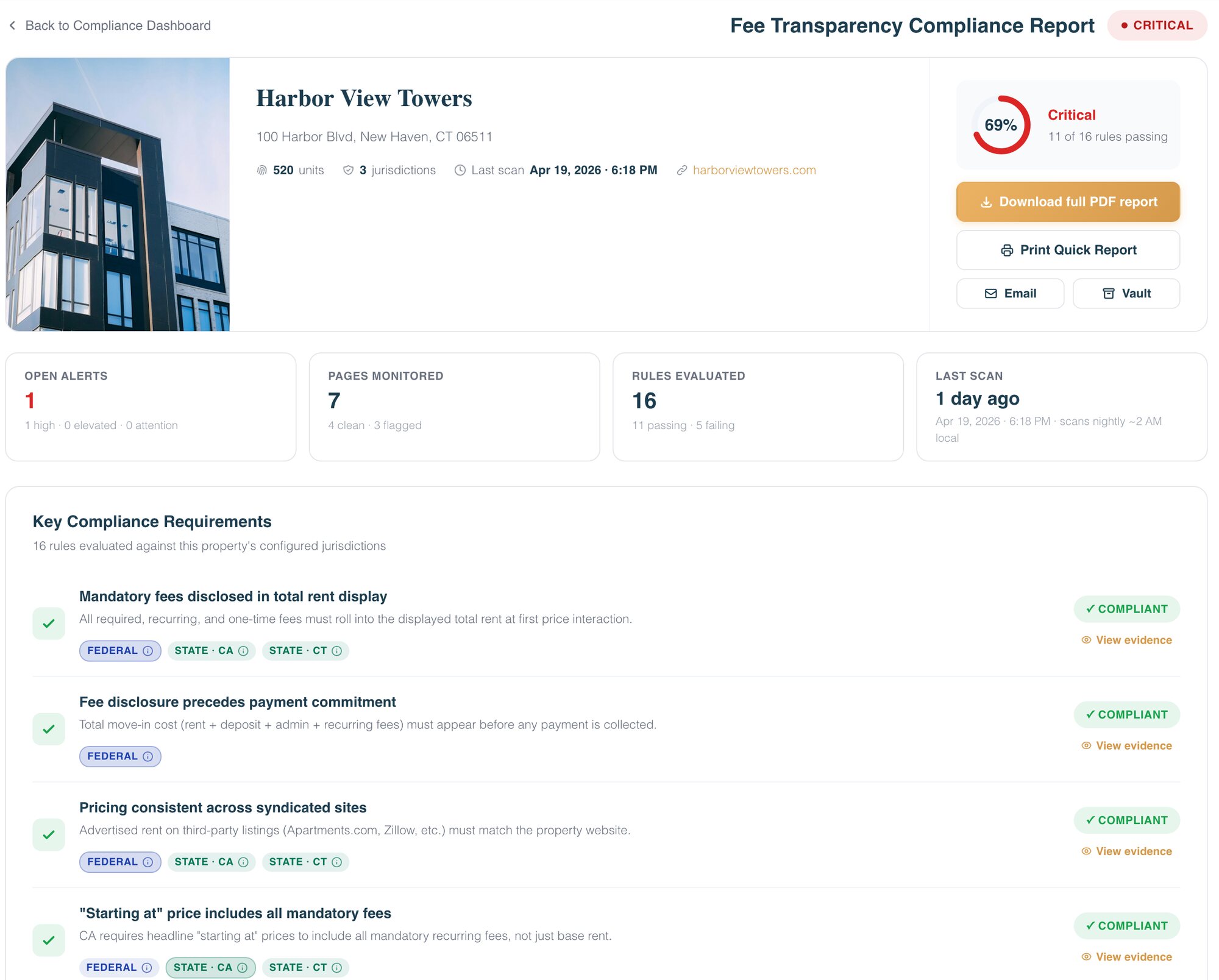
Fee Transparency in Compliance360 checks the pages where rent is advertised every night (homepage, pricing, floor plans, unit listings, availability, the fee guide and the application flow) against the fee-disclosure rules for each property's jurisdictions, and keeps a timestamped capture of every finding. Listing Consistency covers the ILS row: it compares fees and rent range from five sources (Apartments.com, Apartment List, Zillow, Zumper and HelloData) with your PMS feed nightly, and the Resolution Center counts a fix as resolved only when the next scan agrees. Brynson works with these listing sites as partners.
You only need the ILS parity check
Listing Consistency compares each listing with your PMS feed field by field, nightly, and shows the expected value beside the value found.
You only need the evidence trail
SiteArchiver captures pricing and fee pages daily and on change, on a hash-chained ledger, so you can show what a page said on a given date.
Your PMS already offers all-in pricing
Keep it switched on, and still test the output: a display setting does not catch a stale ILS fee, a hard-coded banner or an apply flow that takes payment first.
Frequently asked questions
Automate a nightly or weekly check of every surface, plus a same-day check when a PMS fee changes, a template ships or a special launches. A listing refreshed last week can still carry a stale fee, so neither a recent update nor a quarterly review proves a fee is right.
Treat any difference as a finding: a listing fee that differs from the PMS misstates what the renter will pay, and the Greystar order bars misrepresenting "the existence or amount of any fees or costs." Trace each mismatch to the feed mapping or override that caused it.
Keep a dated, full-page capture of each surface showing the fee, with the URL, device and the PMS value it was tested against. Replayable, tamper-evident captures are harder to dispute than loose screenshots.
You can sometimes edit a listing by hand, but the next feed sync may overwrite it and the error returns. Fix the value in the PMS or the feed mapping, then confirm on the next sync that the listing agrees before closing the finding. Brynson works with Zillow and Apartments.com as partners.
A mandatory fee is one a renter cannot lease without paying, and it belongs in the monthly total. An optional fee is chosen, like reserved parking. A contingent fee, such as a late fee or pet rent, applies only in some cases and should be shown with when it applies.
How we checked this
Written by the Brynson Research Team and checked against the primary sources below. Each source shows the date we last read it. We update this page when the rules change; see the change log.
- [Proposed] Stipulated Order for Permanent Injunction, Monetary Judgment, and Other Relief, FTC and State of Colorado v. Greystar Real Estate Partners, LLC et al., No. 1:25-cv-00165-CNS (D. Colo.), Federal Trade Commission, 2025-12. Accessed 2026-10-22.
- House Bill 25-1090, Concerning Protections Against Deceptive Pricing Practices (signed act, adding C.R.S. 6-1-737), Colorado General Assembly, 2025-04-21. Accessed 2026-10-22.
- Greystar Agrees to Pay $24 Million to Stop Deceptive Advertising Practices as a Result of FTC, Colorado Lawsuit, Federal Trade Commission, 2025-12-02. Accessed 2026-10-22.
- HB25-1090 Protections Against Deceptive Pricing Practices (bill page and status), Colorado General Assembly, 2025-04-21. Accessed 2026-10-22.
- Hidden Fees (SB 478), California Attorney General. Accessed 2026-10-22.
- The July Fee Transparency Reset, Entrata, 2026-07-06. Accessed 2026-10-22.
- Apartment Listing Accuracy Report, Brynson Research Team, 2026-10-22. Accessed 2026-10-22.
Change log
- First published.
This guide is general information, not legal advice. Laws and regulator guidance change; check the current rules for your properties with your counsel before acting.