
Website Accessibility Tools for Property Management Companies: Compliance360 and Point Tools Compared for Multifamily
For marketing, digital, procurement and compliance leads at multifamily operators choosing how to test and monitor accessibility across many property websites.
A property management company needs a tool that tests every property site and the rental application against a chosen WCAG level, explains each fix, re-scans after releases and keeps a dated record. Compliance360 does this beside fee, listing and fair housing checks. For accessibility alone, WAVE, axe, Pope Tech and Siteimprove are strong options.
- Page checkers such as WAVE and the free axe DevTools extension test one page at a time; they do not watch 200 sites for you.
- Automated testing finds only part of the problem: ten tools together caught 71% of 143 known barriers in a GOV.UK test.
- A WebAIM verification of a website platform covers a named sample on a named date, not every property site built on it.
- Ask every website and application vendor for a current Accessibility Conformance Report on VPAT 2.5Rev, with the WCAG version, sample and test date.
- No tool, widget or audit makes a site conform on its own; tools find and track barriers so your developers fix them in the code.
This guide is general information, not legal advice. Laws and regulator guidance change; check the current rules for your properties with your counsel before acting.
What a multifamily portfolio needs from an accessibility tool
An operator with hundreds of communities needs more than a checker run before launch. Generic round-ups skip these five requirements.
| Requirement | Why it matters on apartment sites | Test it in a demo |
|---|---|---|
| Portfolio view | Property sites in a portfolio often share a template, so one broken component repeats across every community built on it. | Can it group the same failure across 50 sites into one fix? |
| Application flow coverage | Applications, tour schedulers and payment pages often live on a PMS or vendor domain that a marketing-site scan never reaches. | Point it at your live apply link, not the home page. |
| Scheduled re-scans | Specials banners, new photos and vendor releases change pages weekly; a one-off audit is stale by the next release. | Ask how often it re-scans and whether it names regressions. |
| Manual checklist | Automation cannot judge whether alt text describes the B2 kitchen or whether focus order makes sense. | Ask to see where a person records those checks. |
| Dated record | If a demand letter cites a page as it was months ago, you need findings, fixes and dates in one place. | Export the history for one property. |
The baseline is poor across the web: the WebAIM Million 2026 found detected WCAG 2 failures on 95.9% of the top million home pages, with low-contrast text on 83.9%, missing image alt text on 53.1% and missing form labels on 51%. The DOJ's guidance is the right frame for any tool: automated checkers "can be helpful tools" but "a 'clean' report does not necessarily mean everything is accessible" (ada.gov, March 18, 2022). See the ADA guide for apartments.
Compliance360 Web Accessibility: what it does and what it does not
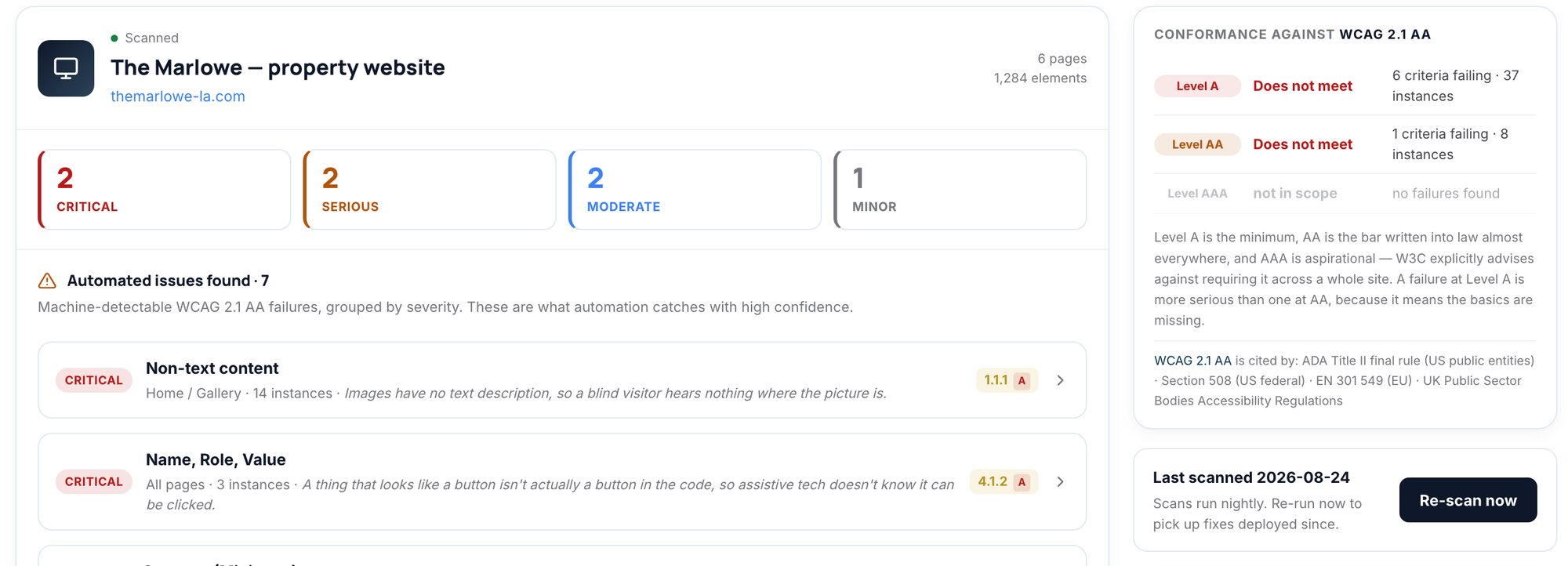
Compliance360 Web Accessibility reviews each property's key pages and the application flow against WCAG 2.1 AA by default, or 2.2 AA, Level A only or AAA if you choose. Each finding names the success criterion, who it affects, the page, selector and markup, with a fix and an effort estimate. Nightly re-scans confirm fixes and name regressions, and the audit record holds findings, checklist and sign-off with dates.
What it does not do matters as much:
- No overlay or widget. Fixes go into the site's own code. See why overlays do not fix apartment websites.
- No "compliant" badge. Findings tell your team what to fix; whether a site meets the law is a question for counsel.
- Not automation alone. A manual checklist covers keyboard traps, focus order, meaningful alt text and readability.
The case for a suite is the shared record. Web Accessibility sits beside Fee Transparency, Listing Consistency, Fair Housing, FrameCheck and SiteArchiver in one coverage view, with one jurisdiction rulebook and one audit trail. That matters because a property's problems rarely stay on one surface: in Brynson's analysis of 6,000 properties and 1.6 million units, about 89% of communities described themselves differently across listing sites.
Nine accessibility tools property management companies use, by job
Checked on each vendor's own site on October 22, 2026.
- 01
Compliance360 Web Accessibility: portfolio review inside a compliance suite
Key pages and the application flow for every property, nightly re-scans and a dated audit record, beside fee, listing, fair housing and image findings (details above).
- 02
WAVE by WebAIM: single-page checks
An online checker plus Chrome, Firefox and Edge extensions that evaluate a page directly in your browser and also check password-protected pages (WAVE extension). WebAIM says WAVE is built to "facilitate human evaluation of web content," which is the right way to use it: a developer or marketer checking one page they just changed (wave.webaim.org).
- 03
axe DevTools browser extension: free checks for developers
Free extension for Chrome, Firefox and Edge built on the open-source axe-core engine. Deque says the free version only runs automated tests, one page at a time. The paid Pro tier adds Intelligent Guided Tests, user-flow analysis and Jira integration (Deque).
- 04
Pope Tech: site-wide scanning powered by WAVE
Uses "the industry standard WAVE testing engine" for site-wide automated scans, adds guided manual tests with scheduling and tracking, dashboards and automated monthly reports by email. A free plan scans a 25-page sample of one website each month; the Team plan starts at $25 a month billed annually ($30 billed monthly) for 50 pages (Pope Tech, pricing).
- 05
Siteimprove Accessibility: enterprise monitoring
Monitors websites, authenticated pages, PDFs and other content continuously, with agents that apply fixes inside CMSs such as WordPress and Drupal and expert reviewers who test with screen readers, magnification and keyboard-only navigation (Siteimprove). The accessibility page lists no prices.
- 06
axe Monitor: site-wide scanning and reporting at scale
Deque describes it as "site-wide scanning, reporting, and business intelligence," scanning sites and PDFs with prioritized issues, scores and progress over time (Deque).
- 07
axe Auditor and WebAIM evaluations: human audits
Deque describes axe Auditor as "systematic manual accessibility testing" (Deque). WebAIM evaluates a representative sample of your pages and reports each barrier, its impact on users and a remediation strategy (WebAIM services). Use one for a new template, a redesign or the application flow.
- 08
Apartments247 Accessible Themes: a verified website platform
A multifamily website vendor whose themes WebAIM verified against WCAG 2.2 A and AA on a seven-site sample as of January 7, 2026 (WebAIM). It does not cover content you add later.
- 09
AudioEye: automated-fix platform
AudioEye says its platform can "fix up to 50% of issues detected within minutes of installation" through automated fixes, adds custom fixes written by its experts, and offers a guarantee program it calls AudioEye Assurance (audioeye.com). Ask what the script changes, whether it reaches your application domain, and what the guarantee covers in writing.
Comparison table: accessibility tool categories for apartment portfolios
"Ask" means the vendor's public pages did not say; confirm it in writing before you buy.
| Category | Examples | Automated or manual | Portfolio view | Application flow | Dated record | Free option |
|---|---|---|---|---|---|---|
| Compliance suite | Compliance360 Web Accessibility | Automated plus manual checklist | Yes, beside five other services | Yes, key pages plus application | Yes, scan history and audit record | No; demo on a live property |
| Page checker | WAVE, axe DevTools extension | Automated, one page at a time | No | Only if you open each step yourself | No | axe extension: free tier. WAVE: not priced on its pages |
| Site-wide monitoring | Pope Tech, Siteimprove, axe Monitor | Mainly automated, with manual testing options | Yes | Ask: third-party domains and logged-in steps vary | Progress dashboards and reports | Pope Tech: 1 site, 25-page sample a month |
| Human audit | axe Auditor, WebAIM evaluation services | Manual, expert-led | Per engagement | If in scope | Report as of a date | No |
| Verified website platform | Apartments247 Accessible Themes | Third-party evaluation of a sample | Covers the themes, not your edits | Ask | Verification statement with a date | No |
| Automated-fix platform | AudioEye | Automated fixes plus expert-written fixes | Ask | Ask | Ask | Ask |
What independent verification of a website platform covers
Some multifamily website vendors publish third-party accessibility evaluations. These are worth asking about, but read the scope. WebAIM's statement for Apartments247 Accessible Themes covers "a representative sample" of seven named themed sites, verified against WCAG 2.2 Level A and AA as of January 7, 2026. WebAIM says it cannot verify "content beyond the scope of the sample, nor content changed after" that date. WebAIM also says its conformance statements are valid for two years and "do not take the place of a VPAT."
Older claims need a date check. 365 Connect announced on June 26, 2019 that it had received a third-party review against WCAG Level AA from Online ADA, covering "the entire 365 Connect Platform, including property websites, lead forms, tour requests, rental applications, portals, and payments" (365 Connect press release). Ask for current evidence.
An operator runs 120 communities on a verified theme. Since verification, marketing added specials pop-ups to 80 sites, a chat widget to all 120 and 3,000 photos. None of that is in the verified sample, so the live sites still need their own testing.
Questions to ask any accessibility or website vendor
The procurement anchor is the Accessibility Conformance Report (ACR): a completed VPAT. ITI offers the template free of charge. The current version is VPAT 2.5Rev (April 2025), in 508, EU, WCAG and INT editions, and version 2.5 includes a column for a more detailed explanation of each reported conformance level.
| Question | A good answer | Red flag |
|---|---|---|
| Do you have a current ACR? | An ACR on VPAT 2.5Rev, WCAG edition, dated within the last year | A 2019 PDF or "we're compliant" |
| Which WCAG version and level did you test? | 2.1 AA or 2.2 AA, stated per criterion | "ADA" with no version |
| What was the sample? | Named pages, including the application and tour scheduler | Home page only |
| How was it tested? | Automated plus manual keyboard and screen reader testing | A scanner score alone |
| Who fixes regressions, and how fast? | A named fix window in the contract | "Open a ticket" |
| Does your product inject scripts that alter our pages? | No, or a clear description of what the script changes | An overlay sold as a fix |
Ask your PMS and application vendors too. The accessible rental application guide covers what to test there.
How to run a two-week accessibility tool pilot
Run the pilot on the same properties for every vendor you shortlist.
Time needed: P14D
- 1
Pick three test properties
Choose one on your newest template, one on your oldest, and one with a third-party application or tour scheduler.
- 2
Seed known barriers
On a staging copy, add a few known failures, such as an unlabeled form field, a low-contrast banner and an image-only floor plan, and record them.
- 3
Scan key pages and the apply flow
Run each tool on the home, floor plan, availability, gallery and application pages, including steps on the vendor domain.
- 4
Score findings, not totals
Count how many seeded barriers each tool found and whether each finding names the element and a specific fix.
- 5
Ship one fix and wait for the re-scan
Fix one finding and check that the tool confirms it, then introduce a change and check that it reports the regression.
- 6
Export the record
Ask each tool for a dated history of one property and decide whether legal and compliance could use it.
Compliance360 puts accessibility in the same coverage view, jurisdiction rulebook and audit trail as fees, listings, fair housing language, images and archived captures. See Web Accessibility and the full Compliance360 suite.
A quick check on one page
WAVE or the axe DevTools extension.
Accessibility-only monitoring for a small portfolio
Pope Tech, starting on its free plan for one website.
A human audit of a new template or the application
axe Auditor or a WebAIM evaluation.
Frequently asked questions
Use a scheduled tool that scans every property's key pages and the application flow, groups repeated template failures, and records fixes with dates. Check how each tool handles vendor-hosted application pages.
They are useful checks for one page at a time, but they do not watch your sites or keep a portfolio record. Use them for developers and spot checks, alongside scheduled monitoring and manual testing.
A VPAT is ITI's free template for documenting accessibility conformance, and a completed one for a specific product is an Accessibility Conformance Report (current version: VPAT 2.5Rev, April 2025). Ask your website, PMS and application vendors for a current WCAG-edition ACR that names the version, level, sample and test date.
It covers a named sample of content against a stated WCAG version and level as of a specific date, and WebAIM says its conformance statements are valid for two years and do not take the place of a VPAT. A verified theme is a good start, but your own photos, specials and widgets still need testing.
No. Compliance360 Web Accessibility installs no overlay or widget. It finds and explains each barrier with where it is and how to fix it, so your developers or website vendor fix it in the site's own code.
Pricing is usually by pages scanned, sites or seats. Pope Tech publishes its prices, from a free plan that scans a 25-page sample of one website each month to a Team plan from $25 a month billed annually for 50 pages; Siteimprove lists no prices on its accessibility page. Count properties times key pages times scan frequency before comparing quotes, because the page tier usually decides the cost.
How we checked this
Written by the Brynson Research Team and checked against the primary sources below. Each source shows the date we last read it. We update this page when the rules change; see the change log.
- Guidance on Web Accessibility and the ADA, U.S. Department of Justice, Civil Rights Division, 2022-03-18. Accessed 2026-10-22.
- VPAT, Information Technology Industry Council (ITI), 2025-04. Accessed 2026-10-22.
- The WebAIM Million: 2026 report, WebAIM, 2026-02. Accessed 2026-10-22.
- What we found when we tested tools on the world's least-accessible webpage, GOV.UK Accessibility blog, 2017-02-24. Accessed 2026-10-22.
- Apartments247 Accessible Themes conformance statement, WebAIM, 2026-01-07. Accessed 2026-10-22.
- WebAIM website verification, WebAIM. Accessed 2026-10-22.
- WebAIM services, WebAIM. Accessed 2026-10-22.
- WAVE Web Accessibility Evaluation Tools, WebAIM. Accessed 2026-10-22.
- WAVE browser extensions, WebAIM. Accessed 2026-10-22.
- axe DevTools browser extensions, Deque Systems. Accessed 2026-10-22.
- axe Monitor, Deque Systems. Accessed 2026-10-22.
- axe accessibility tools, Deque Systems. Accessed 2026-10-22.
- Pope Tech, Pope Tech. Accessed 2026-10-22.
- Pope Tech pricing, Pope Tech. Accessed 2026-10-22.
- Siteimprove Accessibility, Siteimprove. Accessed 2026-10-22.
- AudioEye, AudioEye. Accessed 2026-10-22.
- 365 Connect press release, June 26, 2019, 365 Connect, 2019-06-26. Accessed 2026-10-22.
- Apartments247, Apartments247. Accessed 2026-10-22.
Change log
- First published.
This guide is general information, not legal advice. Laws and regulator guidance change; check the current rules for your properties with your counsel before acting.