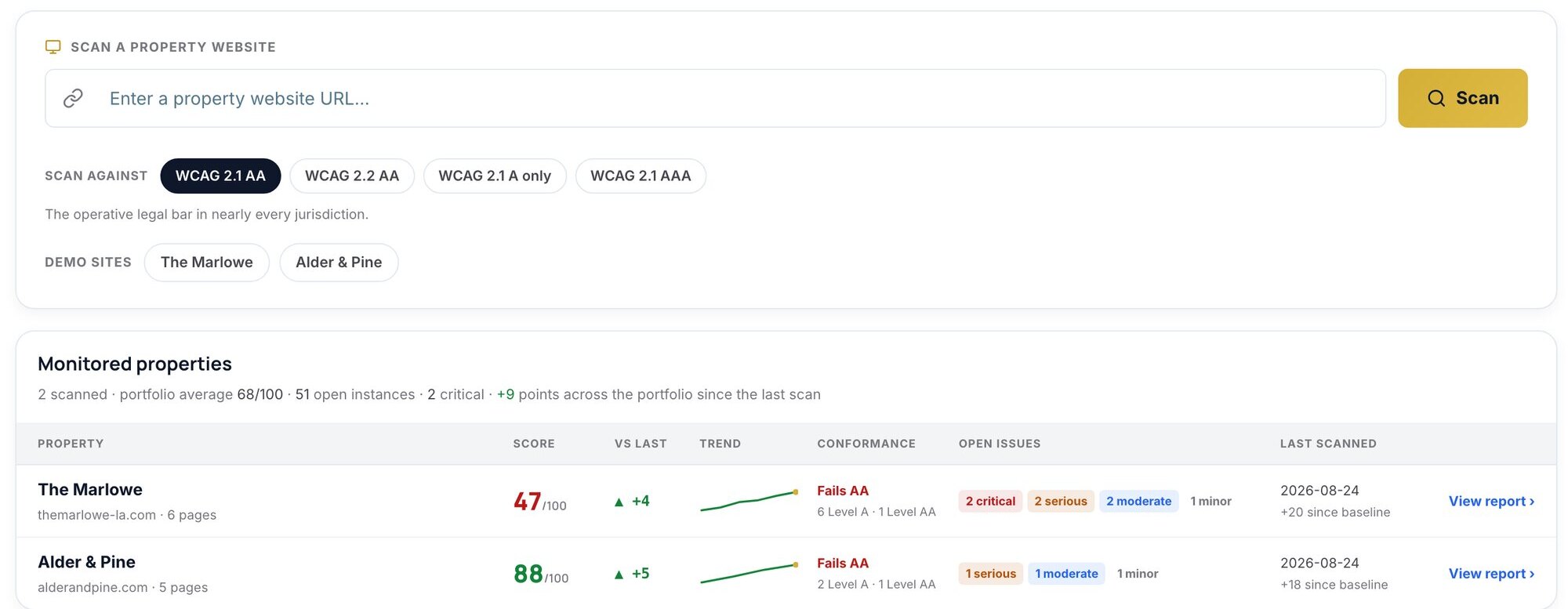
Compliance360 reviews your property websites and the application flow against WCAG 2.1 AA, explains every finding in plain language with exactly where to find it and how to fix it, and gives your team a checklist for the criteria only a person can verify.
Key pages and the application flow are evaluated against WCAG 2.1 AA, nightly.
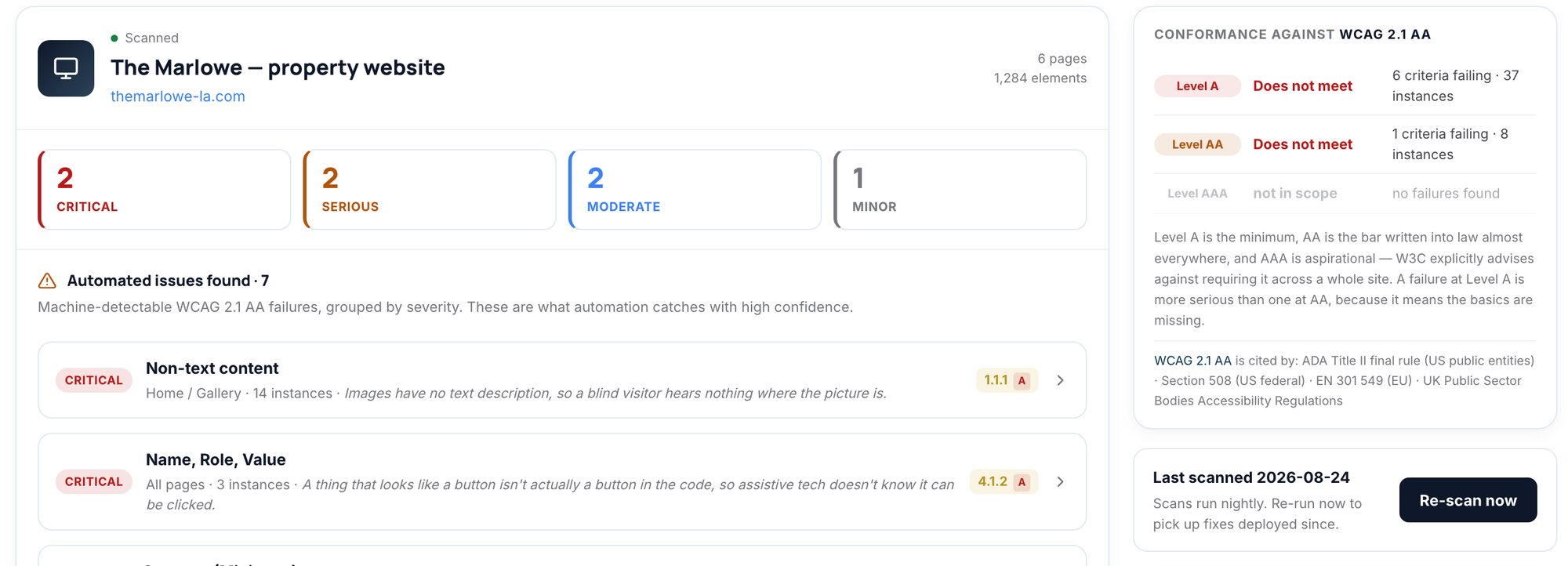
Each failure comes with the success criterion, who it affects, exactly where it is, and how to fix it, with an effort estimate.
A manual checklist covers what automation can’t judge: keyboard traps, focus order, meaningful alt text, readability.
Scan history shows what was fixed and what was introduced each time, and the audit record captures it all.
Machine-detectable WCAG failures grouped by severity, each mapped to its success criterion and level.
Page, selector, the markup itself and steps to see the problem yourself.
A specific fix for each finding with a low, medium or high effort estimate.
The criteria automation can’t verify, for your team to check off and record.
Score over time, with every fix and every regression named.
Findings, checklist and sign-off in one dated record.
Web Accessibility isn’t only a compliance tool. The same finding protects revenue, brand and renters’ trust.
See it on your portfolioEvery renter can browse, tour and apply, whatever device or assistive tech they use.
The selector, the markup and the fix, ready to put in a ticket.
Show you scan, review and remediate on a schedule.
A dated history of every finding, fix and re-scan, if a claim ever arrives.
A widget that claims to fix accessibility automatically, or a PDF audit that’s out of date by the next site release.
Web Accessibility sits beside the property’s fee, listing, fair housing and image findings in one coverage view. SiteArchiver adds the history: it can show how the site functioned on a given date, with the accessibility tree captured, which matters when a claim cites a page as it was months ago.
Web Accessibility shares your properties, jurisdictions and audit trail with five more services. See the whole suite.
Jurisdiction-aware language analysis across listings, websites, paid social and Google, including the portfolio-wide “blast radius” of a single phrase.
Daily audits of advertised vs. total price. Flags mandatory fees missing from the headline number before the FTC or your state AG does.
Catches the moment a listing on Apartments.com, Zillow or Apartment List drifts from what your PMS says: rent, beds, fees, amenities.
The source of truth for every image that represents a property. Registers each photo against the original in your own archive and shows exactly what changed. Then a person decides.
Point-in-time captures of what a consumer actually saw: replayable, hash-chained, and ready to flag for legal hold.
Yes. Compliance360 tests your site against the WCAG level you need to meet (2.1 AA by default), lists every element that needs adjusting with exactly where it is and how to fix it, and re-scans to confirm each fix. A short checklist covers the criteria a person has to confirm, such as meaningful alt text and focus order, so your team can sign off the full standard.
WCAG 2.1 AA by default, the level written into the DOJ’s ADA Title II rule, Section 508 and EN 301 549. You can also scan against WCAG 2.2 AA, Level A only or AAA.
The key pages of each property website and the application flow, where renters are most likely to get stuck.
Each report includes a manual review checklist for them, such as keyboard traps, focus order, meaningful alt text and readability, so your team can check and record them.
No. Overlays are widely discredited and a frequent target of claims. Compliance360 finds and explains issues so they can be fixed in the site itself.
We’ll run it on a live property and walk you through what it finds, and what the rest of Compliance360 adds.