
Apartment Website Accessibility Checklist: WCAG 2.1 AA for Every Multifamily Page Type
For digital marketing managers, web producers and compliance leads who review property websites across a multifamily portfolio.
Check an apartment website page type by page type against WCAG 2.1 AA: gallery photos and floor plans need text alternatives, unit maps, tour schedulers and chat must work by keyboard, application fields need labels and readable errors, and text needs 4.5:1 contrast. Automated tools catch only part of WCAG, so mark which items a person must verify.
- WebAIM's 2026 scan found detectable WCAG failures on 95.9% of the top million home pages, led by low contrast text at 83.9%.
- Test eleven apartment page types, from home and floor plans to the rental application and resident portal login, with WAVE, axe and the keyboard.
- Eight checks, including keyboard traps, focus order, meaningful alt text and time limits, need a person because scanners cannot judge them.
- Publish an accessibility statement with a review date, known limitations and a route for reasonable accommodation requests.
- Re-run the checklist after any template, widget or vendor change, and keep a dated record of findings and fixes.
This guide is general information, not legal advice. Laws and regulator guidance change; check the current rules for your properties with your counsel before acting.
How to run this checklist
One person, one property site, one browser. The checklist targets WCAG 2.1 Level AA, the technical standard in DOJ's 2024 ADA Title II rule for state and local government web content. If a contract asks for 2.2 AA, the extra criteria are in WCAG 2.2 for apartment websites; everything below still applies.
Tools, all no-cost: WebAIM's WAVE extension (Chrome, Firefox, Edge), Deque's axe DevTools Extension (Free), which tests one page at a time, the keyboard (Tab, Shift+Tab, Enter, Space, arrows, Escape), and a screen reader: VoiceOver, built into Mac and iPhone, or the free NVDA on Windows. WAVE also checks contrast ratios for every text element on a page at once.
Each row below is marked Auto (a scanner flags it), Manual (a person must judge it) or Both. W3C says evaluation tools "can not determine accessibility, they can only assist in doing so", and DOJ warns that a "clean" report "does not necessarily mean everything is accessible." Passing this checklist supports a review; it does not make a site compliant.
A coordinator at a 40-property operator spends about two hours on the shared template, then 25 minutes per property on the rows that change by property (photos, floor plans, map, tour scheduler): roughly 17 more hours. Hence: test the template deeply, then sample properties.
What fails most often, and where it shows up on a property site
WebAIM's February 2026 scan of the top one million home pages found detectable WCAG failures on 95.9% of them, at an average of 56.1 errors per page. Six error types made up 96% of everything detected. Each one has an obvious home on an apartment site:
| Failure | Home pages affected | WCAG 2.1 criterion | Where it hides on an apartment site |
|---|---|---|---|
| Low contrast text | 83.9% | 1.4.3 Contrast (Minimum), AA | Pastel brand text, grey price labels, text over hero photos |
| Missing alternative text | 53.1% | 1.1.1 Non-text Content, A | Gallery photos, floor plan images, amenity icons, the EHO logo |
| Missing form input labels | 51% | 3.3.2 Labels or Instructions, A; 1.3.1, A | Lead forms using placeholder text as the label, tour schedulers |
| Empty links | 46.3% | 2.4.4 Link Purpose, A | Icon-only social links, map pins, floor plan thumbnails |
| Empty buttons | 30.6% | 4.1.2 Name, Role, Value, A | Gallery arrows, chat launchers, menu and close (X) buttons |
| Missing document language | 13.5% | 3.1.1 Language of Page, A | Templates and Spanish pages with a missing or wrong lang |
All six are machine-detectable, so clear them first.
The checklist, by apartment page type
Work down the table on one property. "Typical fix" is what goes in the vendor ticket.
| Page type | Criteria (level) | Checked by | Two-minute test | Typical fix |
|---|---|---|---|---|
| Home and navigation | 2.4.1 Bypass Blocks (A); 2.4.7 Focus Visible (AA); 3.1.1 Language of Page (A); 1.4.10 Reflow (AA) | Both | Press Tab once: a "Skip to content" link, the usual way to meet 2.4.1, should appear. Keep tabbing: focus is always visible. At phone width, no sideways scrolling. | Add a skip link, restore the focus outline the theme removed, set lang="en" (or es) on each page template. |
| Floor plans and pricing | 1.1.1 Non-text Content (A); 1.3.1 Info and Relationships (A); 1.4.3 Contrast (AA) | Both | With a screen reader, open one plan: beds, baths, size and price should be read as text, not "image". Run WAVE contrast on the price card. | Put plan details in real text beside the image; mark up pricing tables with header cells. Patterns in accessible floor plans and photo galleries. |
| Photo gallery and video tours | 1.1.1 (A); 2.1.1 Keyboard (A); 4.1.2 Name, Role, Value (A); 1.2.2 Captions, Prerecorded (A) | Both | Open the gallery by keyboard, move with arrows, close with Escape. Listen to three photos. Play the video tour muted: captions? | Describe the room, not the file ("Kitchen with quartz counters and gas range"); label arrow and close buttons; caption every walkthrough video. |
| Amenities and neighbourhood map | 1.1.1 (A); 2.4.4 Link Purpose (A); 2.1.1 (A) | Both | Can you reach every map pin by keyboard? Does an icon-only amenity tile have a text name? Is the same information available as a list? | Name each icon; add a text list of nearby places beside the embedded map. See the map patterns. |
| Interactive unit or site map | 2.1.1 (A); 2.1.2 No Keyboard Trap (A); 4.1.2 (A); 1.4.1 Use of Color (A); 1.4.11 Non-text Contrast (AA) | Manual | Select an available unit without a mouse, then Tab out of the map. Can you tell available from leased without relying on colour? | Offer a filterable list of available units next to the map; give each unit shape an accessible name and state. |
| Tour scheduling | 2.1.1 (A); 3.3.2 (A); 4.1.2 (A); 2.2.1 Timing Adjustable (A) | Manual | Book a tour keyboard-only, including the date picker and time slots. If the slot is held on a timer, are you warned and allowed to extend? | Allow typed dates as well as the calendar; label slot buttons with date and time; warn before any hold expires. |
| Chat and leasing assistant widgets | 2.1.1 (A); 2.1.2 (A); 4.1.2 (A); 4.1.3 Status Messages (AA) | Manual | Open chat with Enter, ask a question, then leave with Tab or Escape. Is the reply announced? Does the launcher cover content at 200% zoom? | Name the launcher button, move focus into and back out of the panel, announce new messages through a live region. |
| Contact and lead forms | 3.3.2 (A); 1.3.1 (A); 1.3.5 Identify Input Purpose (AA); 3.3.1 Error Identification (A) | Both | Submit the form empty. Is each error named in text next to the field? Clear the placeholder: is a visible label still there? | Visible label on every field, autocomplete on name, email and phone, text errors that say what to fix. |
| Rental application | 2.1.1 (A); 3.3.1 (A); 3.3.2 (A); 2.2.1 (A); 2.4.3 Focus Order (A) | Manual | Start an application keyboard-only, skip a required field, submit, then wait on a step. Does focus move to the error? Does a timeout warn you? | Errors announced and focusable, session warnings with an extend option, a published alternative way to apply. Full test plan in accessible rental applications. |
| Resident portal login | 3.3.2 (A); 1.3.5 (AA); 3.3.1 (A); 1.4.4 Resize Text (AA) | Both | Sign in at 200% zoom. Do the fields autofill? Is "wrong password" given as text the screen reader reads? | Labelled fields with autocomplete="username" and current-password, text errors, no fixed-height containers that clip at zoom. |
| Footer, accessibility statement and EHO logo | 1.1.1 (A); 2.4.4 (A) | Both | Is there a link to an accessibility statement on every page? Does the Equal Housing Opportunity logo have a text alternative? | Add the statement (template below) and alt text such as "Equal Housing Opportunity". Logo rules themselves are in the fair housing advertising checklist. |
Contrast thresholds for the floor plan, footer and brand rows: normal text needs 4.5:1, large text (at least 18 point, or 14 point bold) needs 3:1, and buttons, input borders and map shapes need 3:1 under 1.4.11. Reflow is tested at a width equal to 320 CSS pixels, which is a 1280-pixel window zoomed to 400%.
Eight checks no automated scanner can make
Scanners flag the six common failures above. These eight need a person to judge them.
- 01
Alt text that actually describes the unit
1.1.1 Non-text Content (A). A scanner sees that alt text exists, not that "IMG_4471" is useless. Test: listen to five gallery photos; a renter who cannot see them should learn the room, the finish and the view. Decorative flourishes stay silent (empty alt).
- 02
Keyboard traps in widgets
2.1.2 No Keyboard Trap (A). Chat panels, specials pop-ups, embedded maps and virtual tour viewers are the usual culprits. Test: Tab into each, then leave with Tab, Shift+Tab and Escape. If focus sticks, a keyboard user must reload and loses their place.
- 03
Focus order that matches the page
2.4.3 Focus Order (A). On availability pages focus often jumps from filters to footer and back to unit cards because CSS rearranged the layout. Test: Tab through and check the order follows what you see, and that opening a modal moves focus into it.
- 04
Focus you can see on brand colours
2.4.7 Focus Visible (AA). Themes that remove the browser outline to suit the design fail here. Test: Tab across the header, "Apply now" and "Schedule a tour". Lose track of focus once and it fails.
- 05
Errors a person can understand
3.3.1 Error Identification (A). A scanner cannot tell whether "Invalid input" helps. Test: enter a past move-in date and leave income blank, then read each message. It should name the field and say what to do ("Enter a move-in date after today").
- 06
Time limits on holds and applications
2.2.1 Timing Adjustable (A). Unit holds, tour slot reservations and application sessions often expire silently. WCAG requires that the person can turn the limit off, adjust it to at least ten times the default, or be warned and given at least 20 seconds to extend it with a simple action, at least ten times. Limits longer than 20 hours, and limits essential to the activity, are exempt. Test: start a step and wait.
- 07
Zoom and reflow on the pages that sell
1.4.4 Resize Text and 1.4.10 Reflow (AA). At 200% zoom, floor plan cards, price breakdowns and the application must not clip text or hide buttons; at a 320-pixel-wide view nothing should need sideways scrolling. Sticky "Apply" bars and chat launchers often cover half the screen here.
- 08
Information carried by colour alone
1.4.1 Use of Color (A). Colour must not be "the only visual means of conveying information". Green for available and grey for leased on a site map, or a red border as the only error sign, fails. Test: view the page in greyscale and check status is still clear from text or shape.
Accessibility statement template for an apartment community
W3C's guidance says a statement should contain at least a commitment to accessibility, the standard applied and contact information, and recommends adding known limitations and the measures you take. A housing provider has one more thing to say: the Fair Housing Act makes it unlawful to refuse "reasonable accommodations in rules, policies, practices, or services" a person with a disability may need (42 U.S.C. 3604(f)(3)(B)), so tell people how to ask for one, including another way to apply.
Fill the brackets. Never state conformance a dated review does not show.
Accessibility at [Community name]
[Management company] wants everyone to be able to find, tour and apply for a home at [Community name], including people who use screen readers, keyboards, magnification or other assistive technology.
Our standard. We aim for this website to meet the Web Content Accessibility Guidelines (WCAG) 2.1 Level AA. We review it [monthly / after every site release] using automated tools and manual keyboard and screen reader checks. It was last reviewed on [date].
Known limitations. [For example: the interactive site map cannot yet be used by keyboard; the list of available units on the Floor Plans page shows the same information. Some third-party tools, such as [tour scheduler / payment portal], are provided by other companies; we have asked them to fix the issues we found.]
Need help or another format? If anything on this site is hard to use, contact [name or role] at [phone] or [email], or visit the leasing office at [address] during [hours]. We will respond within [number] business days.
Reasonable accommodation requests. If you need a change to how we do things because of a disability, for example help completing the rental application by phone or in person, a paper application, more time, or information in another format, tell us at [phone or email]. Using this route will not delay or disadvantage your application.
How to run an accessibility review on one apartment website
The order that gets the most found in the least time, for one property site.
Time needed: 2 hours
- 1
List the pages
Write down one URL for each page type in the checklist table: home, a floor plan, the gallery, amenities, the map, tour booking, contact, the application start and the portal login. Note which ones a third-party vendor runs.
- 2
Run WAVE and axe on each page
Run both free extensions on every listed page and record the errors with their WCAG criteria. Clear the six common failures first, since they are quick and machine-confirmed.
- 3
Do the keyboard pass
Put the mouse away and complete the core tasks: find a floor plan, book a tour, start an application, open and close chat. Note every trap, invisible focus and unreachable control.
- 4
Do the screen reader pass
With VoiceOver or NVDA, listen to the gallery, a floor plan and the contact form. Check that photos describe the room, plan details are text and every field announces its label and errors.
- 5
Check zoom, reflow and colour
Zoom to 200%, then narrow to phone width, on the floor plan, pricing and application pages. View the site map in greyscale to confirm status is not shown by colour alone.
- 6
Publish or update the accessibility statement
Fill the template with the review date, the known limitations you found and a working phone and email for help and reasonable accommodation requests. Link it from the footer of every page.
- 7
Ticket, fix and re-test
Send each finding to the owner with its criterion, location and fix, and re-run the same test once it ships. Close the item only when the re-test passes, and keep the dated record.
When to re-run it, and what to keep
Accessibility drifts for the same reason listings do. In Brynson's analysis of 6,000 properties and 1.6M units, although 97% of listings had been updated within the previous 90 days, conflicting mandatory fees, missing amenities and contradictory terms persisted. A pass in March says nothing about October.
| Trigger | What to re-run |
|---|---|
| Site template or theme release | Every row, on the template and two sample properties |
| New or updated vendor widget (chat, tour scheduler, specials pop-up, cookie banner) | Chat, tour and Home rows, plus the keyboard trap check on every page the widget loads on |
| Application or portal vendor change | Rental application and Resident portal rows, end to end |
| New photos, floor plans or video | Gallery and Floor plan rows for that property |
| Brand or colour refresh | All contrast checks, including buttons and focus outlines |
| No change at all | Automated scan monthly, full manual pass quarterly |
Each review should leave a dated record: pages reviewed, WCAG version and level, each finding with criterion and location, who fixed it and when, the re-test result and the manual checks a named person signed off. That record is what the demand letter guide and the evidence retention guide build on. Put the same terms in vendor contracts: WCAG 2.1 AA, a fix window by severity, and notice before any template or widget change ships.
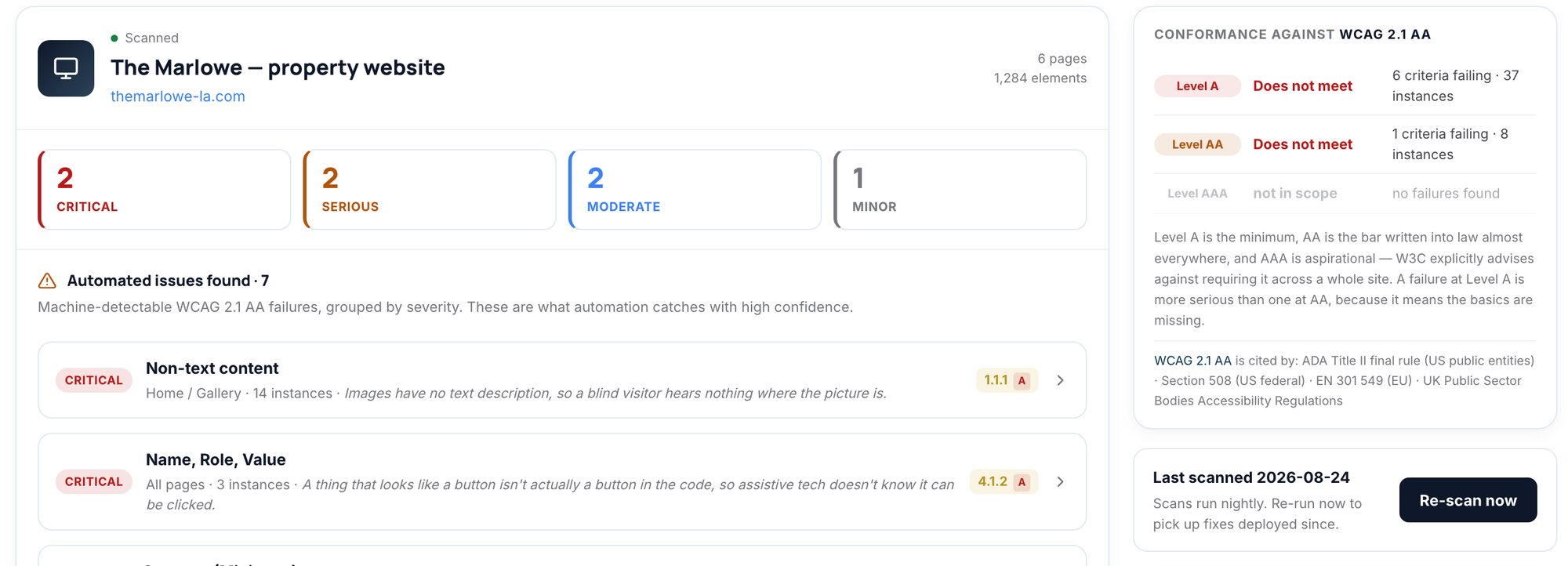
Compliance360 Web Accessibility runs this kind of review across a portfolio. It reviews each property's key pages and application flow against WCAG 2.1 AA by default (or 2.2 AA, Level A only or AAA), gives every finding its success criterion, location and a fix with an effort estimate, and includes a manual review checklist for keyboard traps, focus order, meaningful alt text and readability. Nightly re-scans and scan history show each fix and each regression, and the audit record keeps findings, checklist and sign-off on one dated record. It supports your review; it does not decide whether a site meets the law. See Web Accessibility or the full Compliance360 suite.
Frequently asked questions
Cover every page type a renter uses: home, floor plans and pricing, gallery and video, amenities and map, any interactive unit map, tour scheduling, chat, contact forms, the rental application and the resident portal login. Test each against the WCAG 2.1 AA criteria that apply, and add an accessibility statement with a route for reasonable accommodation requests.
Scanners find missing alt text, labels, link and button names, page language and most contrast failures. They cannot judge whether alt text is meaningful, focus order makes sense, a widget traps the keyboard, an error message helps or a timed hold can be extended. W3C says tools can only assist, so those checks need a person.
Re-run the relevant rows whenever the template, a vendor widget, the application or portal, or the brand colours change. With no changes, a monthly automated scan and a quarterly manual pass is a reasonable floor; no rule sets that cadence, it is our editorial guidance.
We found no federal rule that requires a private housing provider's website to carry one, but W3C recommends it and it gives renters a route to help. For a housing provider it is also where to explain how to request a reasonable accommodation, such as applying by phone or on paper.
At minimum a commitment to accessibility, the standard you aim for and contact details, which is W3C's core list. Add your last review date, known limitations and third-party tools you do not control, plus how to request a reasonable accommodation and another way to apply.
WebAIM's WAVE extension and Deque's free axe DevTools Extension both flag machine-detectable WCAG failures one page at a time. The keyboard and a screen reader, VoiceOver (built into Mac and iPhone) or the free NVDA on Windows, cover the manual checks. None of them alone can confirm a site is accessible.
How we checked this
Written by the Brynson Research Team and checked against the primary sources below. Each source shows the date we last read it. We update this page when the rules change; see the change log.
- Web Content Accessibility Guidelines (WCAG) 2.1, W3C, 2025-05-06. Accessed 2026-10-22.
- WCAG 2 Overview (publication history), W3C Web Accessibility Initiative. Accessed 2026-10-22.
- Understanding Success Criterion 1.4.3: Contrast (Minimum), W3C Web Accessibility Initiative. Accessed 2026-10-22.
- Understanding Success Criterion 1.4.10: Reflow, W3C Web Accessibility Initiative. Accessed 2026-10-22.
- Understanding Success Criterion 1.4.1: Use of Color, W3C Web Accessibility Initiative. Accessed 2026-10-22.
- Understanding Success Criterion 2.2.1: Timing Adjustable, W3C Web Accessibility Initiative. Accessed 2026-10-22.
- Guidance on Web Accessibility and the ADA, U.S. Department of Justice, ada.gov, 2022-03-18. Accessed 2026-10-22.
- Fact Sheet: New Rule on the Accessibility of Web Content and Mobile Apps Provided by State and Local Governments, U.S. Department of Justice, ada.gov, 2024-04-08. Accessed 2026-10-22.
- 42 U.S.C. 3604, Discrimination in the sale or rental of housing, Legal Information Institute, Cornell Law School. Accessed 2026-10-22.
- Developing an Accessibility Statement, W3C Web Accessibility Initiative. Accessed 2026-10-22.
- Selecting Web Accessibility Evaluation Tools, W3C Web Accessibility Initiative. Accessed 2026-10-22.
- The WebAIM Million: 2026 report on the accessibility of the top 1,000,000 home pages, WebAIM, 2026-02. Accessed 2026-10-22.
- WAVE Chrome, Firefox, and Edge Extensions, WebAIM. Accessed 2026-10-22.
- axe DevTools browser extensions, Deque Systems. Accessed 2026-10-22.
- Contrast Checker, WebAIM. Accessed 2026-10-22.
- About NVDA, NV Access. Accessed 2026-10-22.
Change log
- First published.
This guide is general information, not legal advice. Laws and regulator guidance change; check the current rules for your properties with your counsel before acting.